Delbert Johnson wrote:
How does the IPAQ hook up to that Magellan 310? A friend
has the teletype GPS
software I can "try out" on my IPAQ
...Chrissi

Cozy Mk-IV 13B-turbo
 www.CozyGirrrl.com
SNIP <<
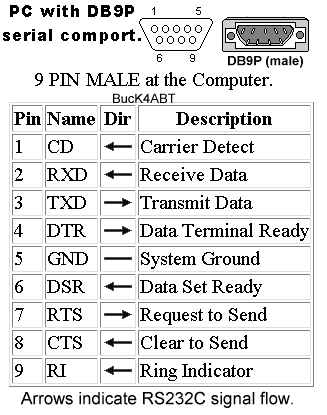
The attached drawing is the pin out description for the 9pin DIN connector
that is on the back of most PCs. I wired up my Garmin GPS 90 unit to send
data to the PC by wiring up a DCE 9pin Female DIN connector.  I can't find
my Garmin manual but if I recall, it gave me the wire specs on the small
connector that comes out of the mounting housing.  It looks like I used
three wires: Gnd, TXD, & RXD. These are all that are needed (typically)
unless the GPS unit or IPAQ are expecting handshaking signals.  Note that
the TXD pin on the GPS side must match the RXD pin on the PC or IPAQ side
AND the RXD pin on the GPS must match the TXD pin on the PC/IPAQ side.

I originally wired my GPS up to communicate with my PC so that I could
upload new Airport data to the GPS.  I recently tested the GPS datastream
and received it just fine on the PC but not on the IPAQ.  The problem was
that the IPAQ cable is a DCE device designed to communicate to DTE devices
like PCs.  In otherwords, the TXD pin on the IPAQ and the GPS were pin 2 on
both units and the RXD pin was #3.  In order to communicate one unit must be
listening on the pin that the other is transmitting on.

If your going to use your Magellan GPS to communicate to the IPAC you will
need to:
      1.  Locate the information on the wire harness for the Magellan.
      2.  Purchase a Male DB9 connector.
      3.  Wire the RXD, TXD and GND to the same pins as shown on the attached
drawing.
In otherwords, you need to make it look like a PC (DTE - Data Terminal
Equipment device)

If you want to use your Magellan GPS to communicate to a PC you will need
to:
      1.  Locate the information on the wire harness for the Magellan.
      2.  Purchase a Female DB9 connector
      3.  Wire the RXD, TXD and GND to pins 3,2 and 5 respectively on the DB9
connector.
In otherworks you need to make it look like the IPAQ (DCE - Data Carrier
Equipment).

If you want to use your Magellan GPS on to communicate to both the PC and
the IPAQ you will need to:
      1.  Choose and implement one of the above options.
      2.  Purchase an additional Male AND Female DB9 connector to be used as a
CUSTOM gender mender.
3. Wire the GND to GND (pin 5), TXD to RXD, and RXD to TXD from the Male
DB9 to the Female DB9
4. Use this converter to connect to whichever unit the cable made in
step one does not work with.
The crossover gender mender forces one device to appear as a DCE and the
other as a DTE.  The DTE device is normally the device with the Male
connector (PC) and the DCE is the device with the female connector (IPAQ).

The nice thing about RS232 connections is that you can mess up the wiring
and you won't hurt anything. I need to wire up a gender mender in order to
get my GPS to work with the IPAQ. There are gender menders out there but
they won't work because they don't cross over the TXD and RXD cables.  If
you can find one that comes apart you might buy the tool the pushes the pins
out so that you can move them on one of the DB9 connectors.

Hopefully this will get you started.
The AirCraft Rotary Engine NewsLetter.              Powered by Linux.
ACRE NL web site.
http://home.earthlink.net/~rotaryeng/            http://www.linux.org