Matt Prather wrote:
I'd like to subscribe....

Is there an archive where I can ready previous newsletters?

Matt-
Sorry. No archives Matt.

Paul Lamar
Matt,

I am on for some time now and while I am still dreaming about playing
around
with rotaries at this time, I have a lot of the posts saved. I won't have
time to look for specific posts, but I am willing to forward you what I
have.
I suggest to do it day by day. Depending how good your mailbox is I
suggest
up to 10 days per day and you should have enough reading to do :)))
Normally I will not have any posts saved that deal with meeting/flyin/etc.
dates.

Thomas J.
Hi Matt
Skydoc here, the one in Kansas, I've got about two years worth of ACRE
on my hard drive in MS Outlook.   I'm trying to figure out away to put the
information on CD's or DVD's so that I can carry them around with my
laptop.   No luck yet but I've got a couple of kids working on it.   If any
one has any ideas I could use them.   And I hope I I'm not breaking any rules
if so please drop me a note.   Other wise I could send them to you as soon as
I get the transfer figured out.   There is a TON of good information in the
mailings.   Blue skies, Ron Maglaughlin
We have a CD available with all six years for $40.
It is full at around 650 meg. All graphics and pictures are
included.

The files are in Netscape format. These files are basically
huge ASCII text files. One for each month. Named by month and year.

On the CD is Netscape 4.7 in a self extracting zip. Or you can download
Mozilla for free.

Install NS or Mozilla.

You then copy these files over to the "nsmail" folder
that also holds the "Inbox", "Sent" and "Drafts" files among others.
In Mozilla the folder is called "Local Folders"
Once that is done the monthly files appear when you run NS or Mozilla.
They then can be searched in a myriad ways using key words.

You don't need to run Mozilla or NS as your primary email program to do this.
You can still run Outlook Express or Internet Explorer.
In fact I recommend you do not run NS as an email program as it is
rather buggy. Mozzila on the other hand is a perfectly good email
program.

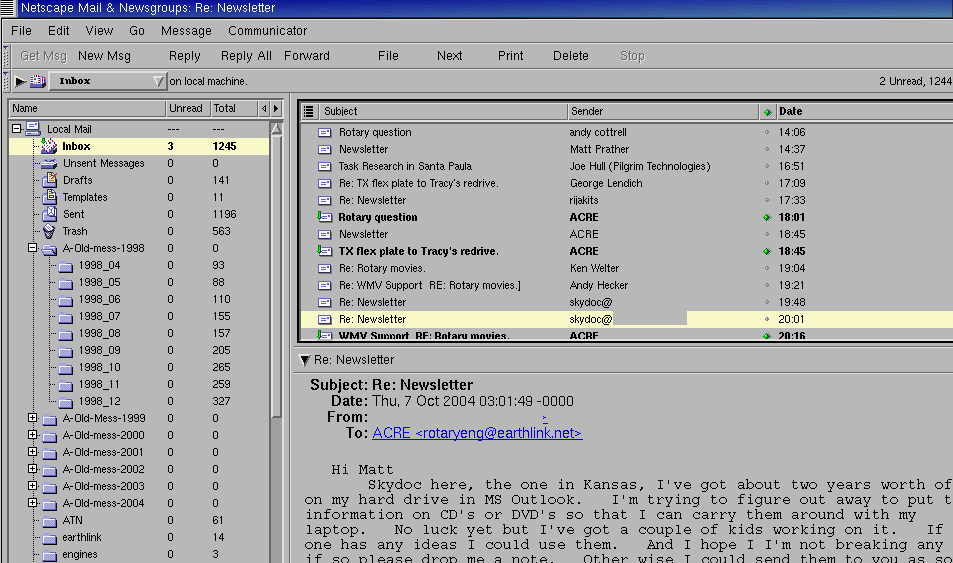
Here is what the NS Messenger screen looks like when you have done this
correctly.
Paul Lamar
Paul I hear what you are saying.  I think we have been over this discussion
before.  I believe what Matt and certainly I would like to do is edit the
volume down by deleting repetitive and unrelated dialog that naturally
occurs when we attach our responses to an unedited thread. Since we are
communicating on a mailing list of which you manage naturally the 'new'
information that we can pick up everyday is only a percent of the data we
actually receive.  Perhaps is edited the last 6 years will fit on one CD
disc. If a few of us work together we could come up with a CD that could be
searched by subject.   Ie click on  in 'turbochargers' in the index and all
threads in chronological order would come up.  This would enhance the ease
of use of the CD.

Perhaps their could be a section on the disc with members addresses, and
emails, contact info etc.

Pictures of planes flying or in progress.

What do you say?

Doug in Japan
That is the hard way but it can be done. Any editor that can handle monthly ASCII
50 meg files will work. I use a super fast command line Word Star clone called
"joe" on Linux. You are looking at a tremendous amount of work. Much of the size
of these files is due to the jpgs and gifs they contain. You will not save
that much space by eliminating redundant text. My guess is you will only save
more like 10%. Most graphic uploads are right around 300K. The text messages
are usually about 10K or less.

If you use NS or Mozilla you can not only search in a lot of categories but you
can sort in a lot of categories as well. You can then delete what you don't want.

If you can program in QB or C (ugh) you can convert the files to comma
delimited and then load them into any serious data base program.

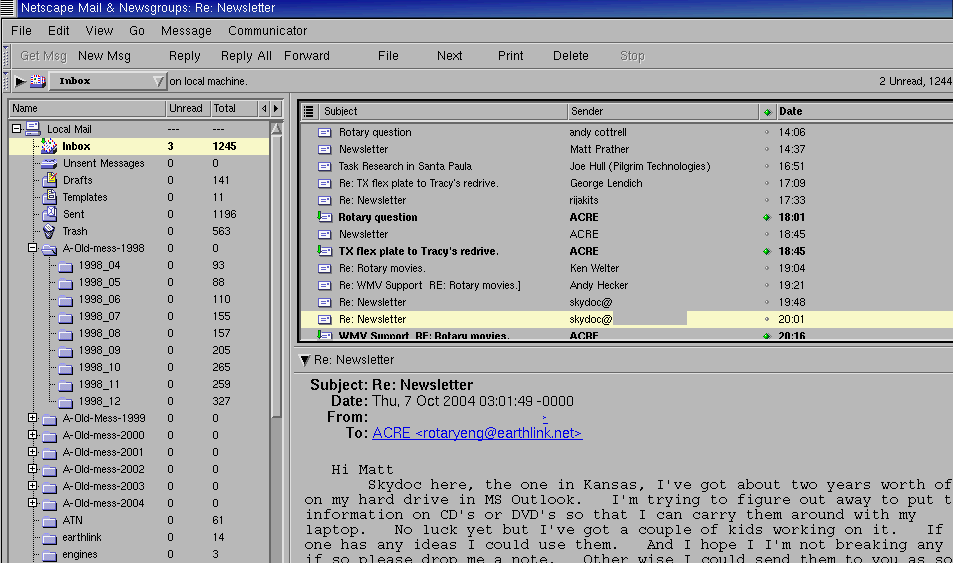
Also if you arrange the files in a tree structure such as "/all-old-mess/year/month/"
within NS or Mozilla and you start with "all-old-mess" the search engine will search
everything. If you start with "year" it will search only that year. If you start with "month"
it will search only that month. You can see from this NS screen capture how I have arranged
the files by year. I don't use "all-old-mess" as it takes too long to search
all of the files. I can usually guess about what year something was discussed.

I suggest you try NS or Mozilla before you go off the deep end and try to edit
the data.

Paul Lamar

The Rotary Engine NewsLetter.  Powered by Linux.
ACRE NL web site. http://home.earthlink.net/~rotaryeng/
Copyright 1998-2004 All world wide rights reserved.