> > Anybody up to speed on Excell
> >
> > How do I subtract a couple of times formated
> > as 3:33:53:454?
> >
> > hours:minutes:seconds:hundreads of seconds
> >
> > Paul Lamar ...No rotor no motor.
>
>
> Hi Paul,
>
> I can't say for sure if Excell is the same, but in the OpenOffice
> spreadsheet I can format the cell as HH:MM:SS.00 When I subtract one
> cell from another, it just does it. I notice you have 3 digits in the
> last group. Did you mean thousands of a second?
>
> You might consider donwloading OpenOffice. Version 2.0 is out. I'm
> just now trying it. I have opened some fairly complicated spreadsheets
> from Excell with OpenOffice 1.1 and 2.0 is supposed to have even
> better comptatbility. The price is righ, and it runs on Linux as well
> as everything else.
>
> I've attached the spreadsheet in Excell format. You might load it up
> and see how it responds in Excell.
>
> Bob W.
>
>
>Funny you should mention it. I am using Open Office :)
>I thought I was the only person on here using it.
>I figured they did things pretty much the same way as Excell.
>
>Yes the time data is to the nearest 1/1000 of a second.
>
>Here is the coast down data in zipped form.
>The idea here is to subtract the the time increments.
>Convert the MPH to feet per second 88/60 times MPH = FPS
>Subtract the MPH increment.
>Then calculate the instant decelleration (more or less)
>in FPS per Second by dividing by the time increment.
>
>Convert to G's by dividing by 32
>Multiply the G's by 3300 pounds and that gives the drag
>at that MPH number.
>
>Plot the drag as a function of MPH.
>
>There are two coast down data sets. One in each direction.
>
>The zip file has the coast down data and some constant
>speed data. I will get more constant speed data tonight
>on my way home from the hangar.
>
>Paul Lamar ...No rotor no motor.
Wow, what a mess. It would have been a little simpler if the time had
been in the HH:MM:SS.000 format instead of with the colon.
I imported the CVS file into the spreadsheet, cut the MPH and time
column into a new sheet called Calculations, split the HH:MM:SS data
from the thousands, converted the SS to seconds in a real number, did
the calculations as you outlined, and plotted the results. One
assumption I've made is that the actual time interval will never be
more than a couple of seconds. I haven't tested this to see what
happens if you are making these runs thru midnight.
I have included an OO 1.0 and an OO 2.0 version of the spreadsheet
since I don't know which you have. One other note, when I did the
graph, I got a message that said I had to sort the X data. I declined
to do so because I thought that might mess up the calculations. It
seems to have plotted anyway. This is just XY points, but it looks
pretty neat.
I zipped the files, but they didn't compress much
Bob W.
Hi Paul,
I put the divide by 32 in column J. I have to admit that I spent 0
time thinking about the physics and 99% converting the time to real
seconds. :-)
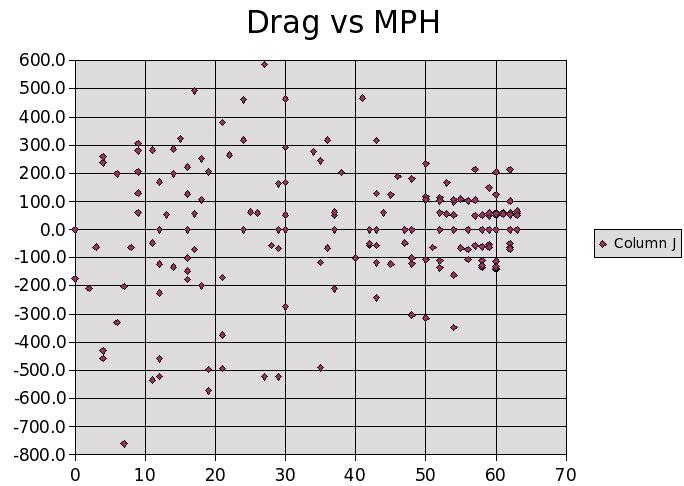
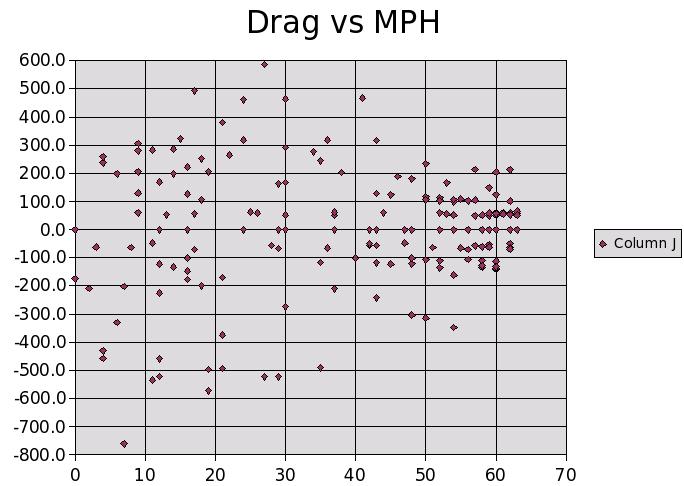
This is the plot from data-10-26-05a. The original data is in sheet1.
The calculations are done on the data copied from columns C and D on
sheet1 into columns A and B on Calculations sheet.
I think the problem is in the deceleration calculation. We need to
do (speed2-speed1)/delta_t. If I do that by changing the formula in
column H to =(G5-G4)/F5, The plot becomes totally scattered between
-800 and +600. Now I notice that the data includes acceleration and
deceleration. A smaller range needs to be selected for the plot.
Looking thru the numbers there doesn't seem to be any real long
sequence of deceleration without the speed bouncing around. For example
starting at 11:31:27.5 the speed is 60 60 58 56 57 56. That indicates a
lot of scatter in the input data.
I've attached the plot using all the data after changing the formula in
column J to use delta fps.
Bob W.
http://www.bob-white.com
N93BD - Rotary Powered BD-4 (projected engine start in November)
Custom Cables for your rotary installation -
http://www.roblinphoto.com/shop/
Right Bob I forgot to mention that. All the data is there including
the time required to accelerate. You must start when the MPH is
decreasing and the RPM is less than 1000. That indicates pushing
in the clutch and putting the tx in neutral to start coasting.
In the future I will crop the extraneous data.
Here are the two coast down with the useless and
confusing data removed.
Perhaps we need to use speed as the controlling function.
When the speed changes note the time it changes.
Paul Lamar ...No rotor no motor.
The Rotary Engine NewsLetter. Powered by Linux.
ACRE NL web site.
http://www.rotaryeng.net
Copyright 1998-2005 All world wide rights reserved.