Don't laugh. Dos
has some real time advantages. XP will go into DOS mode. If it
goes into DOS mode it may be possible to do all sorts of real
time hardware stuff like fuel injection systems. Windows and
Linux are multitasking which make them near useless for real time
hardware stuff. Too much back ground house keeping going on.
If it will run DOS it will probably run Quick Basic Compiler that
can access the USB ports directly as serial ports in real time. I
run QB in XP all the time. Quick Basic has real time commands
for directly controlling hard ware including serial ports. It is
small enough that I can email it to you. It is very easy to
learn. Many of us older computer users already know how to program
in QB. I have tons of source code including a moving map program
that takes in data from a GPS. UPS GPS receivers are available. One
can buy a USB to parallel adapter kit that will out put 8 bits at
a time with hand shaking. Each bit could control an injector. The
key is what is available USB as most note books or net books no
longer have parallel printer ports.
The other possibility is boot up DOS directly from a 3.5 inch
floppy disk.
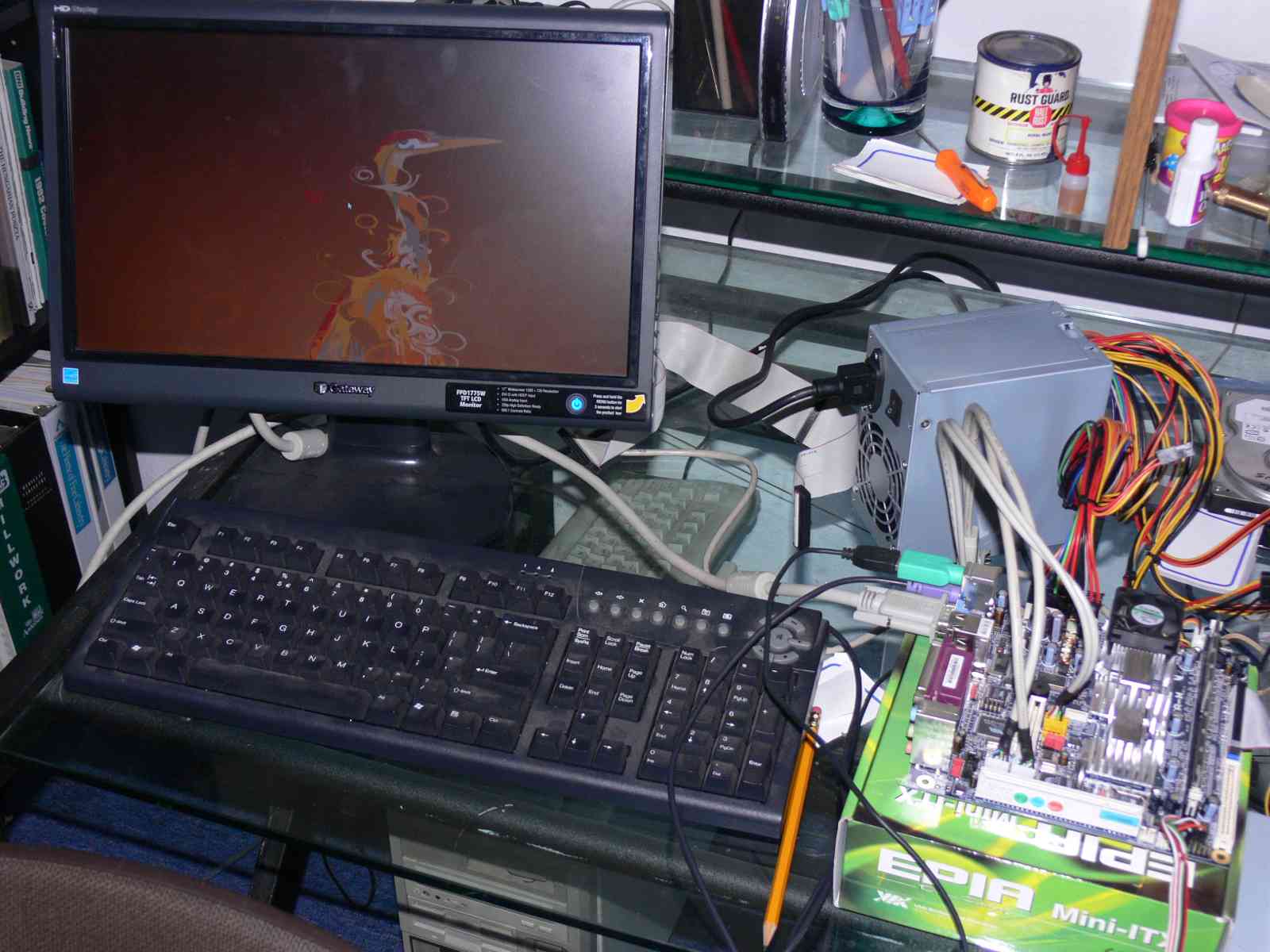
I have a VIA EPIA PC mother board at the hanger that cost less
than $90 with the processor on board with floppy connector. It
has a PCI connector so many PCI cards will plug in. See below.
http://www.via.com.tw/en/initiatives/empowered/pc3500_mainboard/index.jsp
It runs DOS likity split.
--------------------------------------------------------------
Make a folder under 7 called QB1. Save this zip file to that folder.
unzip it and delete the .zip file. Call up the command line. "cd"
to the qb1 folder with a successions of "cd". When you get there
type qb on the commad line and the qb program integrated
development system will run. You will come up in the editor and
you can run the the program directly from the editor or compile it
from the editor. The help is self contained. The editor is smart
and will automatically correct a lot of your syntax errors. It is
the easiest programming language ever written.
type in this program:
for x = 1 to 10
print "craig"
next
exit
A high speed data acq system is trivial to write.
We are talking 1000's, of samples per second here.
It could be as simple as this
Start:
data1= peek (xxxxx) 'where xxxxx is the address of the A to D
hooked to ' the parallel port. print data1 goto start
http://www.petesqbsite.com/sections/tutorials/zines/qboa/4-beginner.txt
Paul Lamar
Yes, package received. Thanks a bunch. This should be quite educational.
When you talk about the bounces, there is an automatic security
block on Ford corporate servers that trashes all messages with .zip
files Probably something similar happened with your post to other
members. This address is my personal box, so it comes right through.
C. Smith
-------------------------------------------------------------------
Here it is my DOS QB EFI source code. Took me less time than I thought.
For illustration purposes I limited the A to D to 2 bits or four
possibilities. Same for the RPM so this is a crude system.
I simulated reading the A to D by a keyboard entry of an integer number
between 1 and 16.
4 MAP readings times 4 RPM readings is 16 so all we have is 16 different
pulse widths. Consider the integer PW number of 60 as 6.0 ms.
This of course could be expanded to a 8 bit A TO D in that case
there would be 8 x 8 or 64 pulse width numbers. That should be
sufficient to get the engine in the mixture ball park.
The trade off here is a couple of hundred dollars worth of stock
PC parts compared to say something like a Megasquirt for easier
programming. All sort of other things can be done with the full
screen of course in terms of displaying all sorts of other data.
For example the screen could read out the real time value of the
pulse width being used and the RPM. It could also total the pulse
widths and read out the GPH. It could also run my DOS-QB based
moving map software as I only need that data out of the GPS once per
second.
A program to access the USB port from DOS would be a big plus.
--------------------------------------------------
I improved the program somewhat by separating the RPM and the MAF
inputs to make it a bit more realistic.
I also added a pulse width generators as mPC hard ware does not
come with one.
CLS
INPUT "Input RPM "; RPM
INPUT "Input MAP"; MAP
position = RPM * MAP '"address" in the mixture table
TYPE PWlist
PW AS INTEGER
END TYPE
DATA ,51,52,53,54,55,56,57,58,59,60,61,62,63,64,65,66,
FOR x = 0 TO position
READ PW
NEXT
PRINT
'pulse width generator
PRINT "00000000";
FOR y = 1 TO PW'delay up for injector trigger.
PRINT "1";
NEXT y
PRINT "00000000" 'take the pulse back down
To change the mixture one modifies the numbers in the DATA line.
This version is still 2 bits to keep it simple.
3 bits would give us 7 combination each for RPM and MAF so the resolution
would increase to 49 pulse widths.
----------------------------------------------------
This makes the DOS-QB-EFI look much better.
http://www.bootdisk.com/usb.htm
All sorts of possibilities are opended up.
Booting DOS from a USB stick would be ideal,
No need for a fragile hard drive.
Booting DOS from a small net book from a USB 3.5 floopy drive.
USB to par. printer port for injector triggers.
USB to RS232.
---------------------------------
I wrote a short program to see how fast QB was in terms of instructions
per second. This was QB running under Windows XP in a command window.
This was my old HP notebook computer so I don't know how fast the
processor is. My guess is 500 Mhz
Here is the program
CLS'clear screen
PRINT TIME$'print the current time to the nearest second.
FOR x = 1 to 9000000 'count up to nine million
NEXT
PRINT x
PRINT TIME$
The program completed in 3 seconds or 3 million QB instructions
per second in interpreter mode. Plenty fast enough.
With out compiling this program and disassembling the compiled
code I don't know how many machine level instructions were needed
for each QB instruction. The compiled code size was 26K bytes. The
compiled code took 8 seconds to complete so something is strange.
Compiled should be faster. I'll run the same test on the stand
alone DOS computer and report back.
Paul Lamar
http://www.cpuid.com/cpuz.php
<
http://www.cpuid.com/cpuz.phpThis will give you all the processor info.
As far as QB, I had
a course on it in the nineties when I was getting my BS. We need to find an
inexpensive small computer that takes DOS. An outline of what hardware is
needed. There seems to be QB sites on the web also. I have a Timex around
here somewhere.
Joe Berki
Limo EZ
----------------------------------------------------------------
PC mother boards are getting smaller and cheaper real fast.
Here is a 6.5" by 6.5" Asus AT3N 74-5 I saw in Fry's today.
It will run DOS probably so it can be used in real time.
It is at least 25 times faster than the average run of
the mill single chip computers found in most EFI systems.
Cost was $160 with the processor.
Intel Atom Intel Atom
Clock rate 1.6 GHz
Data Bus Speed 533 MHz
RAM Installed (Max) 0 MB / 4 GB (max)
VGA
Ethernet
8 Hi-Speed USB
It is low technical risk as it is very simple and quick to
program or change the program.
------------------------------------------------------------
I have decided to go this route for the dyno engine control.
Lots of options for ignition triggers and fuel injection
schemes. Not to mention tremendous data acquisition is almost
automatic.
This is the best I/O card I have found so far but I am still
looking. It is kind of over kill but I don't have to use it
all.
3 counter timers for RPM determination.
Lots of digital I/O plus all of this.
The card accepts up to eight differential or 16
single-ended analog input channels. Inputs are protected
against over-voltage conditions up to +35 volts and
typically survive static discharges beyond 4000 volts. The
channel input configuration is software selectable. When
using the card in differential mode the common mode
rejection ratio is a minimum 80dB at 45KHz and the common
mode voltage rejection capability is +11V.
The input signals are amplified by an onboard
instrumentation amplifier to provide voltage ranges of 10,
5, 1.25-6.25, and 1.25-3.75 volts unipolar and ±10, ±5,
±2.5 and ±1.25 volts bipolar. In addition, you can read 4-
20 mA current inputs by manually installing jumpers to
utilize onboard resistors. In this case, the current input
is converted to an analog voltage range of 1.25-6.25V with
full 12-bit resolution and there can be up to eight inputs.
What this means is I can connect a wide band current output
O2 sensor directly to the card and process the data in QB
software. In effect a closed loop EFI system that will
hold any mixture ratio constant.
Each channel must be dedicated to either voltage or
current. This card contains an industry standard 12-bit
successive-approximation analog-to-digital converter (A/D)
with a sample and hold amplifier input. Under ideal
conditions throughput of over 100,000 conversions per
second is possible. This card has a 2K samples FIFO data
buffer and a 2K words point list buffer. These buffers
give capability for full-speed counter-driven background
data-acquisition with no computer interaction until the
data FIFO needs draining.
This allows 100,000Hz data to be taken with little
processor overhead. A/D conversions may be initiated in
any of three ways: (a) software command, (b) an on-board
programmable timer, or (c) direct external trigger. In
turn, data may be transferred to the computer by any of
three software selectable methods: (a) polling for
end-of-conversion (EOC), (b) polling for a half-full FIFO,
or (c) a half-FIFO interrupt.
This is an extremely powerful EFI system for a few hundred
dollars. Programmed in minutes.
BTW I got the single cylinder demo board and software from
FreeScale but I am sending it back. Too expensive for what
it does. Much harder to program than QB as well.
-------------------------------------------------------
One of the really neat things about DOS Quick Basic for real
time programing is it has hardware interrupt capabilities.
In other words regardless of what the program is doing
it can be interrupted by an external electrical signal and forced
to run a sub program to deal with it. For example we could
interrupt the QB program every time the rotary hit TDC on
rotor one. At 7500 RPM this happens only 125 times a second.
A piece of cake for a PC processor that is 25 times as fast as
your average CPU found in a typical EFI system.
One trick is to use a USB to RS232 adapter and use the Clear
To Send signal as an input to QB from the crank angle sensor.
The QB command is: ON COM(1) GOSUB ServiceTDC
---------------------------------------------------------
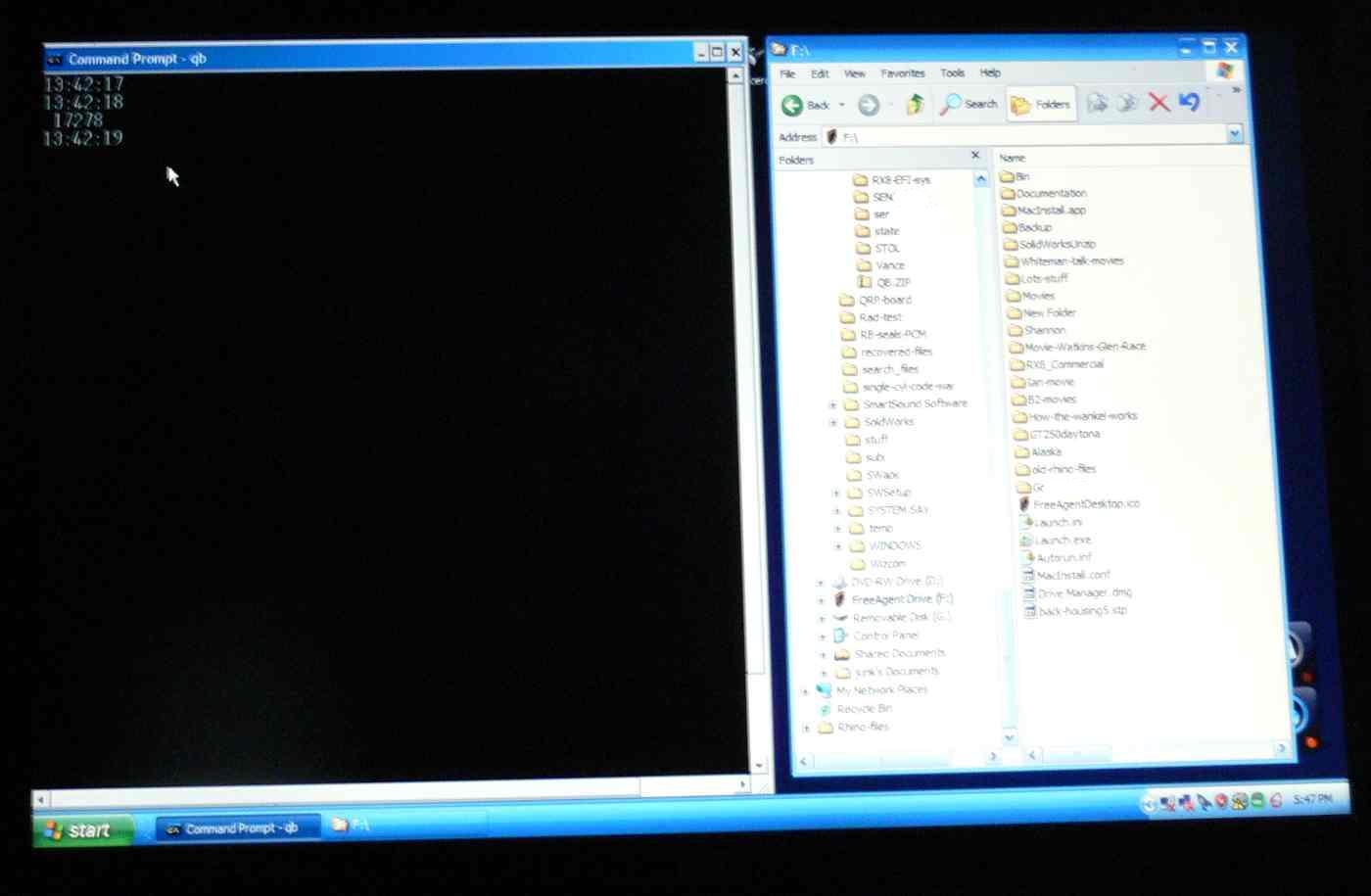
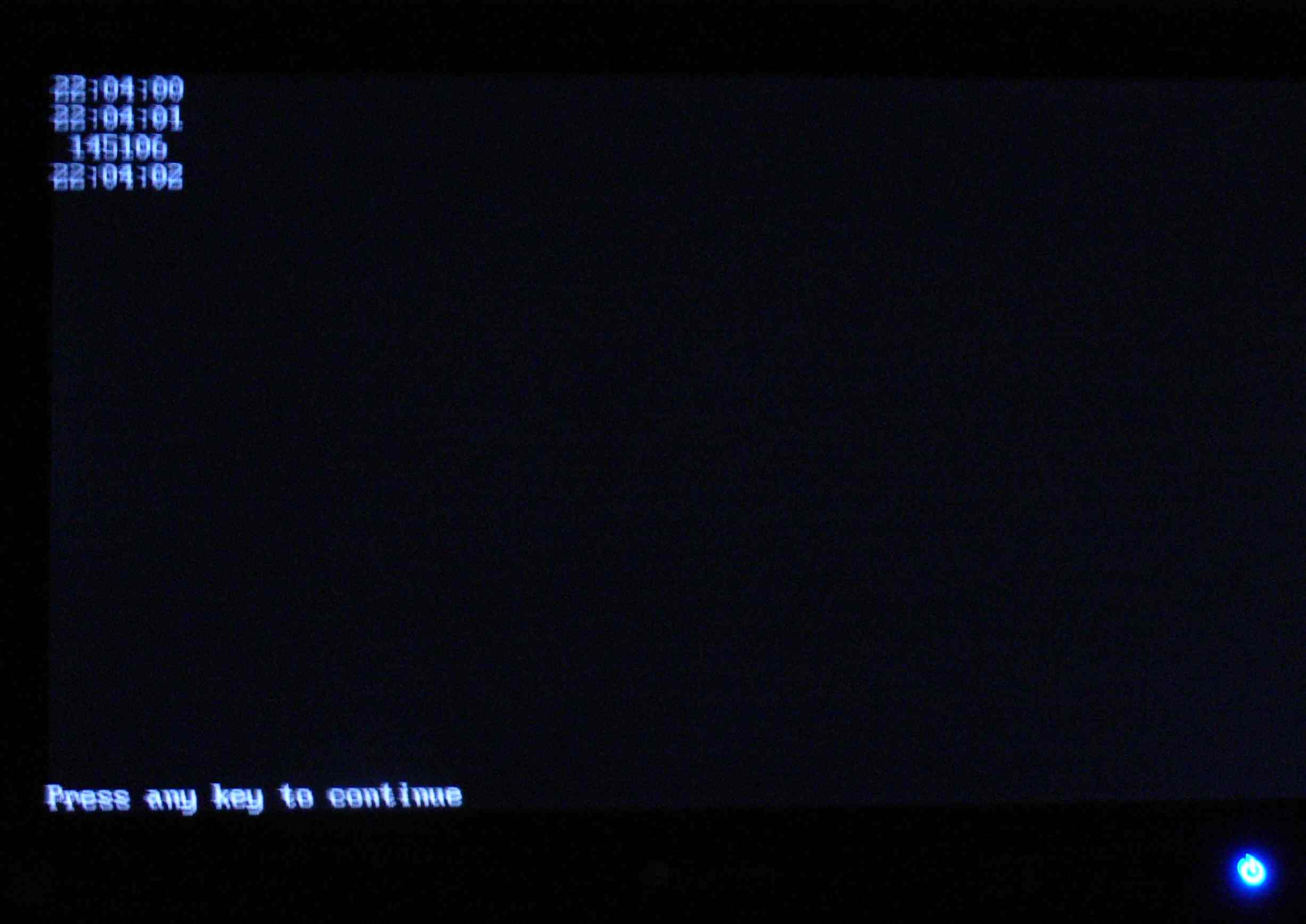
I set up a program that would test the speed of the DOS QB
program running under Windows XP and the same program running
under DOS on two similar computers. One DOS running under XP and
the other directly from modern hardware running good old DOS.
Frankly I was stunned. The XP version executed 17,278 steps in one
second and the native DOS version executed 145,106 steps in one second.
That is over 8 times faster!!!!!!!!!!
Worse than that the XP version was different every time I ran
the program. Some times it was half as fast. Totally unpredictable
and totally unacceptable for a real time program and hardware
controlling high speed hardware. Namely a rotary engine
electronic fuel injection.
I was very pleased to say the least. I'll go out on a limb and state
that DOS and QB have a bright future for embedded real time
applications :)
Here is the program.
CLS 'clear the screen
PRINT TIME$ 'print the real time clock on screen
oldtim$ = TIME$ 'save the real time clock read
tryagain: 'loop address
IF TIME$ = oldtim$ THEN GOTO tryagain 'if time has not changed
PRINT TIME$ 'time has changed more than one second
tim$ = TIME$ 'save the new time
FOR x = 1 TO 900000 'start counting
IF TIME$ <> tim$ THEN GOTO exitit 'if time has not changed
NEXT x 'go back and keep counting
exitit: ' one second has gone by
PRINT x 'print the count on the screen
PRINT TIME$ 'print the new time on the screen
END 'end or stop the program
The real time clock updates once a second.
Paul Lamar
--
The Rotary Engine NewsLetter. Powered by Linux.
ACRE NL web site.
http://www.rotaryeng.net
Youtube key word UTUBPLEASE
Copyright 1998-2009 All world wide rights reserved.