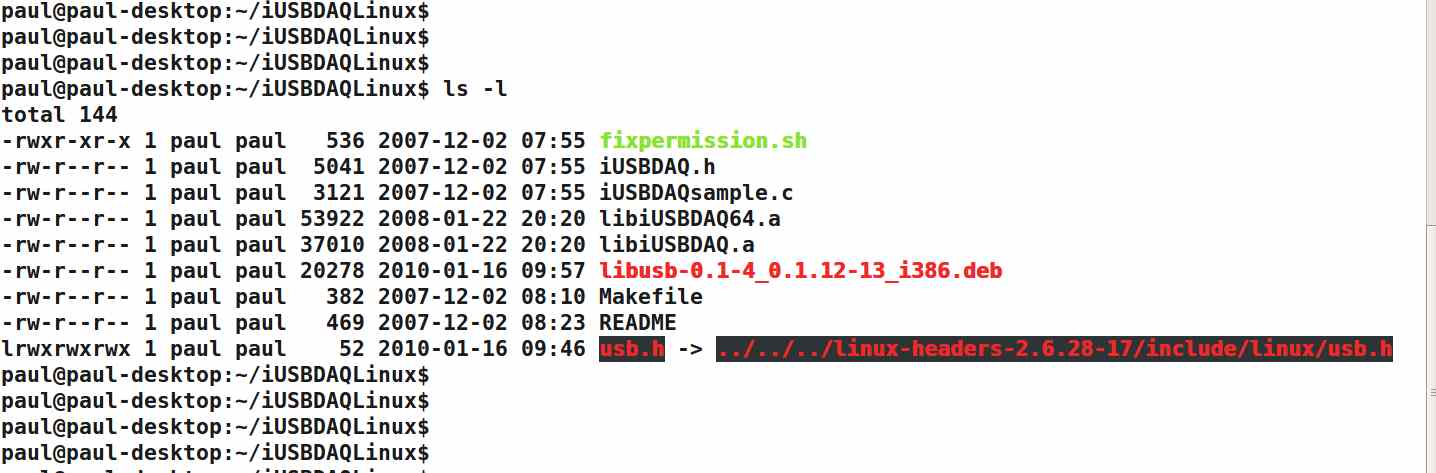
What does this arrow mean?
Paul Lamar
I never look at "file manager" utilities in linux. Too mouse-centric..
"include"? What do the icons for the source ("C") code look like?
Matt-
Not "include".. I missed that utsrelease.h and version.h when I first
looked at the picture.
Are these files actually symbolic links?
Matt-
Could be. I am not familiar with symbolic links and why
you need them. What are they and why does one need them?
Paul Lamar
Symbolic links are a way for a file a file to look to be in one dir,
but for it actually reside in another. This is useful in cases where
you don't want a bunch of copies of a commonly used file. The use of
links can make the path to file simpler to get to.
If you do an "ls -l" on the file that's actually a symbolic link, you
should see an "l" in the far left column for the file's properties.
Symbolic links can also point to directories.
I'm pretty sure DOS never got links.
Matt-
That sounds like the path command in DOS.
You put the directory name in the path and the programs
in that directory can be run from any other directory.
Thanks Matt. That last trick worked great.
It shows the file the link is pointing to.
Paul Lamar
--
The Rotary Engine NewsLetter. Powered by Linux.
ACRE NL web site.
http://www.rotaryeng.net
Youtube key word UTUBPLEASE
Copyright 1998-2009 All world wide rights reserved.