I suggest if you are interested in this system you make
a folder and drag over all the many future messages on this
subject otherwise delete it.
WARNING<<<<<<
Do not change the baud rate in the serial options menu.
------------------------------------------------------
Mark,
I talked to Don and he said it is essential to start
with a project. One can program with out a project
but a lot of error messages do not show up. The project name
must not be the same as the program name.
Here is what he said. I'll fool with it some and give
you more info later.
Posts: 1957
Location: Portland, OR
Posted: 18 May 2010, 19:45 PM Post subject: Re: errors occurred in the
back-end build
process Reply with quote
Paul Lamar wrote:
What could that be?
The back-end build process is the final stage of converting the ZBasic
code
to AVR
executable code. Normally, this phase will complete without error but
there
are a number
of things that can go awry. To determine what's going on we need more
information.
One way to get this information is to add the --verbose option to the
project file. You do
this by selecting the "Open Project File" entry from the Options menu of
the IDE. Your
project file will appear in one of the tabbed windows. Add the following
line near the the
top of the project file:
Code:
--verbose
. Now, when you press F7 to compile the project you'll get a stream of
command lines and
other information appearing in the Output window of the IDE. If an error
does occur in the
back-end build process, it will be visible in that message stream. The
entire block of
text can be selected using the mouse and copied to the clipboard using
ctrl-C. Then, you
can paste it in the edit box (surrounded by "code" tags) in a forum post.
It could be that your reader is using an older version of the compiler
that
might have a
bug in it that your newer version doesn't have. You can determine the
version of the
compiler being used by selecting "About ZBasic IDE" from the Help menu.
The
compiler
version is shown on the line below the IDE version number."
End quote.
-----------------------------------------------------
Mark,
Here is what I found out so far. Open a project and give it a name.
If you are successful it will have Sub Main()
and End Sub in it already. Sort of a skeleton program.
Now open the saved basic program you already have typed
in using Wordpad. Cut and paste your program between sub main and
end sub in your project file.
You are now set up. The "compile" and "go" commands
are now under the Project menu instead of the tools menu.
Future programs should be typed into a project as it opens a whole
host of error messages and other advantages as far as output
to a hard disk file is concerned.
From now on type all basic programs into a project.
The ZBasic docs could be better on this. This concept of a project is not
unique to Zbasic. My Ulead video editing program does pretty much the same
thing.
It always takes a while to get up to speed on Integrated Development
Environments. QB was the first and I still think it was the best
ever. This one is rising in my humble opinion as I learn more about
it.
Back in the old days, before IDE's, one had to write one's program
using an editor, save it on hard disk, open a compiler, compile
the binary program, save the binary program on hard disk, burn an eprom,
insert
the eprom in the target computer, turn on the computer, press reset
and hope for the best. Find a bug and start all over. It took
months if not years.
Paul Lamar
Paul,
Well, I kept getting the same error message, so I "uninstalled" the ZBasic
program, went to ZBasic.net and downloaded and reinstalled the ZBasic
Installer v3.0.2 dated 10 May 2010. That seems to have fixed the
"back-end"
error. I've tried doing a cut-n-paste from Wordpad, even typing the
program
from scratch into the IDE, with the same results. It can't find a file.
Here's what the compiler screen looks like for your little 5-line program.
Sub Main()
Call ADCtoCom1(82, 500)
Delay(1.0)
Call ADCtoCom1(0,0)
End Sub
Results...
"C:\Program Files (x86)\ZBasic\zbasic.exe" --target-device=ZX1280n
--directory="C:\Windows\system32/" --project="test_proj1.pjt"
Error: cannot open intermediate file "zx_FwIc5S\test_proj1.eeb"
Exit code: 1
So, it seems I've corrected the initial problem, but now have a new
problem.
Mark S.
I think the "eeb" is a typo. Are you sure that is not zxp?
It appears to be a problem with the folder you are using.
Here is a plan that might work.
Exit ZBasic.
Go into the Windows search feature.
Select "all files and folders".
Choose "all or part of the file name".
Type in "test_proj1"
Apparently if you don't save it in a particular folder
it will choose or make one for you which you may not like :)
In my case it put it in C:\Documents and Settings\junk\Recent
I did not know I had such a folder because it was buried down several
levels. :)
I used Windows explorer and got down in there and looked
at the file. It was a Windows short cut 1Kb long. I clicked on
the short cut and Zbasic came up with my program in it.
Then I said "save as" and it told me where the rest of the files
were stored at the top of the box. At this point you need to give
it the folder name at the top of the box that you want to use
I think.
From now on everything should be ok. The trick is save the project
in the directory you want before you say compile or "go". Apparently
compile or go makes its own decisions on where it wants to put things
as it does indeed save the project as it must. The compiler must find a
xxx.bas source file or it won't have anything to compile. It also
needs to output a bunch of files to the hard disk someplace.
One is a binary program file the Atmel needs to execute.
The .zxb is a ASCII text file log of a bunch of stuff like target
device, flash page size, compiler version, date generated,
code size and CRC. All very Linux like. You can open these with
WordPad and look at them. The same as appears
in the lower IDE window when you select "compile." The binary
program file follows still in the zxb file and that will be down
loaded to the Atmel when you hit go. That is a bunch of hex
character consisting of the numbers 0 to 9 and a,b,c,d and f.
The other file it makes is a .pjt file which looks exactly
like the .bas file. Don told me about that but I am not
sure what the problems are with that. Something about you
don't want the same names. Over in the Windows Explorer
type column it is identified as a ZBasic IDE Project.
The .bas file on the other hand is identified correctly
in the type column as a source code file. Kind of weird
for the IDE to do that.
In my case I use a USB stick to save everything on. (E:)
I also installed the program from there so perhaps that
is why it choose this directory.
BTW once I got the program in the project I could turn
on disk logging so no need to cut and paste.
Just rename the logged file with less than 8 characters
and QB will load it directly. More on that later after
you get your program running. You are real close Mark.
This kind of stuff always has a steep learning curve
at first. I have been doing it for years but each IDE
is different just like a cell phone.
User interface programmers have no discipline :)
----------------------------------------------------
Mark,
One other thing. When you start a new
project by selecting ProjectNew you have
and opportunity to change the folder/AKA directory
name in the upper part of the box. Select "Change".
It will also tell you what the current directory/folder name is.
I suggest starting over with a new project name
and your directory name of choice.
Here is the program again in text file form.
Sub Main()
Dim x as Integer
Dim val as Integer
For x = 1 to 1000
val = GetADC(82) \ 5
Console.Write(CStr(val) & ", ")
Delay(0.01)
Next
End Sub
This one does a better job of scaling the data to psi.
Cut and paste it from here into your new project.
go to the options menu down near the bottom and select
start logging. It will ask you for a directory name.
Select compile F7 and then select go F5 from the project menu.
What you get for output data is pin float voltage.
You don't need anything connected to pin 82 but
a DC voltage between 0 and five volts would be fun :)
You can do that with a pot and a source of volts
such as a battery box with 2 AAs. 4 fresh AA's are
too much.
Look at the log file with Wordpad and you should see
all the data.
Paul Lamar
Paul,
I'm beginning to think that I should stick to something simpler, like brain
surgery. I followed the above directions and got the same error message
(see below).
"C:\Program Files (x86)\ZBasic\zbasic.exe" --target-device=ZX1280n
--directory="C:\Users\Mark\Documents\Downloads/" --project="myproj5.pjt"
Error: one or more errors occurred in the back-end build process for
"myproj5.zxb"
Exit code: 1
Everything was going good up until I tried to compile (F7). I tried it
three separate times from scratch. I even re-installed the ZBasic program.
Is there a place where they give a detailed explanation of the error codes?
So close, yet so far.
Mark S.
Well we just need to get your compiler tuned up:)
One way to get this information is to add the --verbose option to
the project file. You do this by selecting the "Open Project File"
entry from the Options menu of the IDE. Your project file will
appear in one of the tabbed windows.
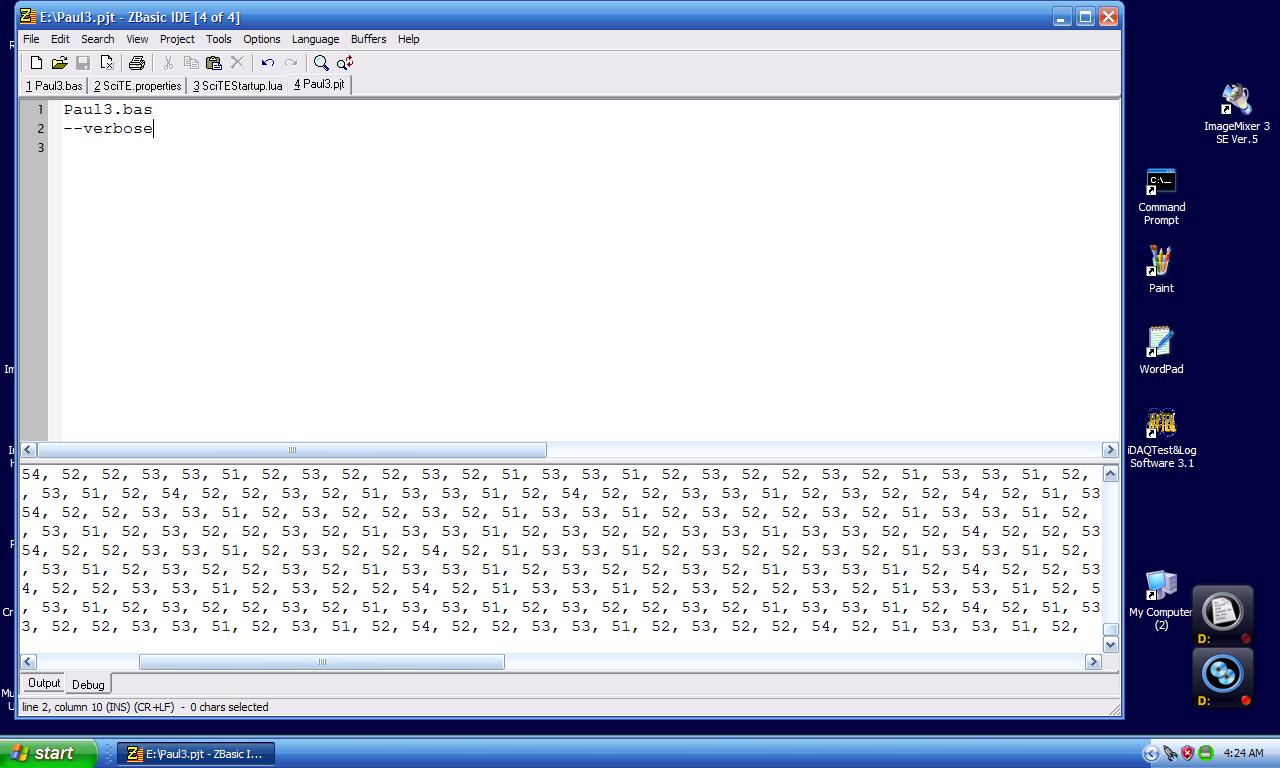
The only thing in my project file at this point was "Paul3.bas"
Add the following line near the the top of the project file:
Code:
--verbose
Now, when you press F7 to compile the project you'll get a
stream of command lines and other information appearing in
the Output window of the IDE. If an error does occur in the
back-end build process, it will be visible in that message stream.
I did this and here is what my project file looks like now.
I saved it and I ran the program again by left mouse button
clicking on "1Paul3.bas" in the tabbed files 3rd menu down from the top
first button labeled "paul3.bas".
I got nothing other than the usual stuff as I had no errors.
Here is a screen capture of my project file.
You are learning a lot about computers in general and Windows
in particular without realizing it :)
Hang in there Mark it is worth it. Programming is one
of life's great creative mediums. Almost anything is possible.
Are you able to do screen shots? Do you have MS Paint?
If so send me a screen shot when you get the error and
I will send it to Don. It is quicker and more accurate that
way.
Paul Lamar
--
The Rotary Engine NewsLetter. Powered by Linux.
ACRE NL web site.
http://www.rotaryeng.net
Youtube key word PaulLamar2
Copyright 1998-2010 All world wide rights reserved.