I notice that once an OS is installed on a HD that drive cannot be read
with another OS or computer. I have a Sata to USB adapter and that does
not work either. Does the OS partition prevent reading?
Must I remove that partition to read the rest of the data?
Will "Gparted" do that?
How?
I took a look at Gparted and the
user interface is not intuitive for me. I don't want to screw
up and lose some data.
Perhaps there is another way to remove or bypass the boot partition
and read the drive in the command line.?
Paul Lamar
You will not be able to read the drive from Windows. Linux generally
uses EXT4 file systems. Windows uses NTFS. Remember when you needed to
add an NTFS driver to your Linux box to read the giant economy size USB
key? Same thing in reverse for Windows except that I don't think there
is a Windows driver to read EXT4 file systems.
You should be able to read from the disk on another Linux machine. It
might be a bit tricky figuring out which partition to mount. The newer
Linux distributions use a new system to manage device names. They are
likely to come up with something strange sounding. CentOS will call
them /dev/sda, /dev/sdb, /dev/sdc etc ... for each drive as it maps it.
If you have the disk in an external enclosure it might mount it on
/media with a volume number.
Mark LaPierre
I set up CentOS to read NTFS and it is working.
Mint reads NTFS out of the box but the MINT OS did not even see it.
Neither did Windows. I think it is going to take partitioning software
to even see the drive.
I did not try the command line. I'll do that next with the USB to
SATA adpater.
Paul Lamar
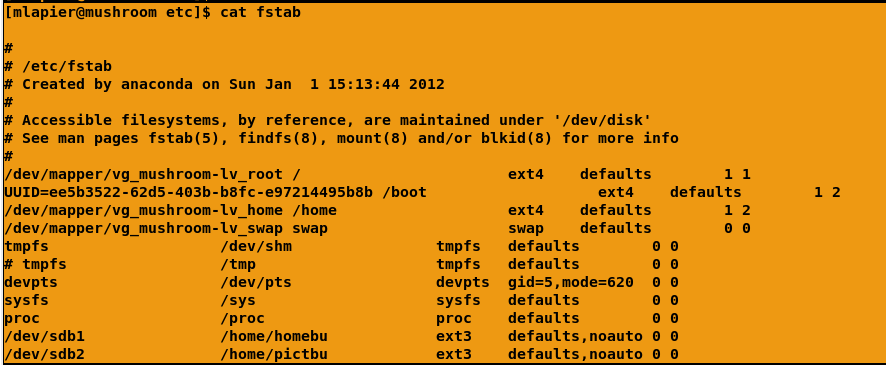
Look at the file /etc/fstab
You should see a bunch of stuff like what's on the attachment
Screenshot.png. All the crap at the top of the list,
/dev/mapper/vg_mushroom-lv_root, is the root partition on my machine.
/dev/mapper/vg_mushroom-lv_home is my home partition where all the home
files are kept.
When you plug your HD into another Linux machine it will not get mounted
because there are no entries for it in the fstab file.
If you plug in something with a usb interface, like that usb key you
mentioned earlier or a camera, you will find an entry for it in a file
/etc/mtab. See attachment Screenshot-1.png. The line at the bottom of
that file is my MP3 player. If you use the SATA <- USB adapter it
might mount up on it's own when you plug it in, if you're lucky. If it
does you'll be able to see it with the lsusb command.
If they don't automount for you to read files from your HD you need to
mount the file systems using the mount command.
mount /dev/sdb1 /home/backup -t ext4
Of course your partition and mount point will be different.
in a terminal type:
man mount
A better idea might be google:
http://linux.about.com/od/commands/a/blcmdl8_mountx.htm
Mark LaPierre
The great thing about Linux is you can open the hood and work on the engine.
With windows the hood is welded shut :)
The drive is out of the machine at the moment. I'll re-install it when I am
a bit more chipper. It is 1:30 AM here :)
Thanks Mark.
Paul Lamar
The Rotary Engine News Letter. Powered by Linux.
ACRE NL web site.
http://www.rotaryeng.net
You Tube key word PaulLamar2
Copyright 1998-2012 All world wide rights reserved.