Dale,
I burnt a couple of different versions of Linux on DVD and tried to
boot them on my Lenova G580 windoz hate computer. No luck. I don't
know how MS black mailed Lenovo but what ever they did they had
their way with this company. Maybe others.
They over looked booting off a ASUS USB DVD read writer that I
happened to have. I stuck the DVD with Mint Mate ISO in the USB DVD
drive and bingo. It booted.
So I burned a Mint Mate ISO on a 4 gig thumb drive and it also booted
off that.
What kind of windoz hate computer do you have? I can't guarantee that
the thumb drive I am going to send you will work in your computer.
Take the Windoz Hate hard disk out and try to boot off the USB thumb
drive.
There are two places in the BIOS that need to be enabled for USB
boot.
Choose legacy every where else.
Then turn it off and install the new blank hard drive reboot off the
thumb and then install the Mint on the new HD.
There is another possibility but I have not tried it so far. You can
get a cheap device that turns an ordinary hard drive in to a USB
hard drive. You might be able to install Mint directly.
The programs that burn ISO's on USB thumb drives and DVD's comes with
Mint/Mate. The ordinary burner program has an ISO option.
For Windoz Hate you have to find them on the Internet if they even
exist at all.
We ought to get a class action suite going for about a billion
dollars. That should get their attention.
Paul Lamar
Hey Dale,
You have to turn off the UEFI in the BIOS before you can boot Linux.
Seeing that you can boot from the USB drive would lead me to believe
your problem is that the DVD you burned is not bootable. Did you
burn the image as a data disk? When you pop the DVD into the DVD
drive with Windows running can you see the file you burned on the
DVD? Can you see any files on the DVD? If you can you have a data
disk.
Mark LaPierre
I turned off UEFI. That did not work. I burned it as an ISO. I have
probably burned about 2 dozen before.
I'll try that right now on the USB DVD read writer.
Here is what I get.
screenshot3.png
I can read some of the files.
This disk booted into live Mint Mate.
----------------------------------------------------------------------
Now I will try it in the built in DVD reader.
Here it is screenshot 4
all the file names are blank files.
The files names are there but I cannot read them.
Paul Lamar
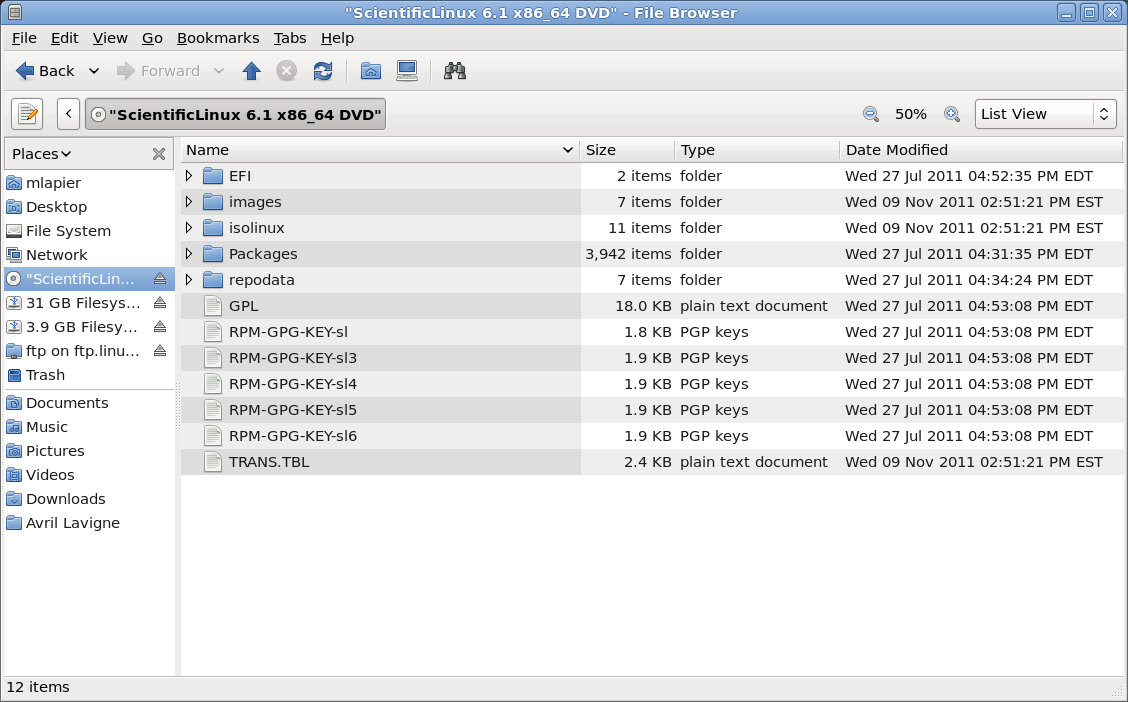
Your boot DVD looks normal in both drives. The file names appear
normally in your file manager.
The attached is a screen shot of a Scientific Linux Live bootable
DVD in
my file manager of choice. As you can see, the file names and folder
names, are very similar to what you have on your DVD.
I remember that I had a problem getting this DVD to boot in my
computer.
When I set up the boot order I selected the wrong optical
drive entry
in my BIOS. I thought that I had burned a data disk because it would
not boot so I went back and burned another being sure to burn a
bootable
disk. It still wouldn't boot from my DVD. Eventually I had
three DVDs
before I discovered that I had not scrolled far enough on my BIOS
screen
to get to the correct optical drive selection. I'm not saying
that you
have this same problem but just double check.
- Mark LaPierre
I am not the only one.
Paul Lamar
-----------------------------------------------------------------------------------------
http://forums.lenovo.com/t5/T61-and-prior-T-series-ThinkPad/Can-t-boot-from-CD/td-p/28092
Can't boot from CD
Options
<http://forums.lenovo.com/t5/T61-and-prior-T-series-ThinkPad/Can-t-boot-from-CD/td-p/28092#>
06-21-2008 05:28 PM
Hello,
I'm trying to reload WinXP onto a Thinkpad T22, Type 2647 but I
can't get the machine to boot from the CD drive.
I've set the BIOS to look for the ATAPI CD drive first in teh
boot sequence and I've made sure that the WinXP boot CD is in and
spinning, but it just bypasses it and boots from the hard drive.
Very frustrating!
I thought it might be a BIOS issue so I downloaded and installed
the latest BIOS upgrade available for the unit. That didn't help.
I know the CD works because I can put the WinXP disk in once the
machine is booted and Autorun is executed. The CD runs and
provides a menu of options.
Anyone have an idea as to why I can't boot from the CD?
Any help is greatly appreciated.
Herb
The Rotary Engine News Letter. Powered by Linux.
ACRE NL web site.
http://www.rotaryeng.net
You Tube
http://tinyurl.com/beqqxas
Copyright 1998-2013 All world wide rights reserved.