Dale, when you get Mint installed there is a utility called
Work Space Switcher. This normally allows up to 32 screens
to be selected. A very powerful feature of Linux and one that I have
used for years in various versions of Linux.
I could not do this newsletter with out it.
Unfortunately any more that 10 workspaces crests havoc in Mint.
Gnome windows sizing stops working for one.
I tried unsuccessfully to notify Mint about this bug but no
luck so far. I tried the latest version I sent on a 4 gig thumb drive
to you and the bug is still there.
Bottom line is: don't select more that 10 workspaces.
Once it happens the only way to fix it is reinstall mint.
Make back up of your files on external USB drives.
Here is how to find and install it:
right click on the panel on the bottom of the screen
select add to panel
scroll down and select work space switcher
It is the last program on the list
It will then appear in the panel at the bottom of the screen.
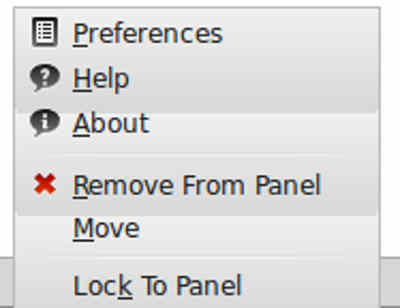
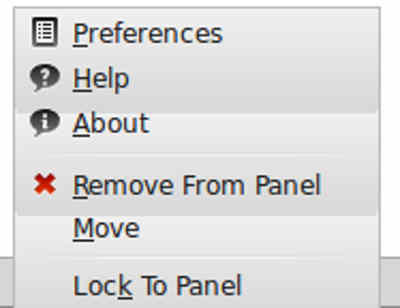
right click on it
WS-screenshot1.jpg will appear.
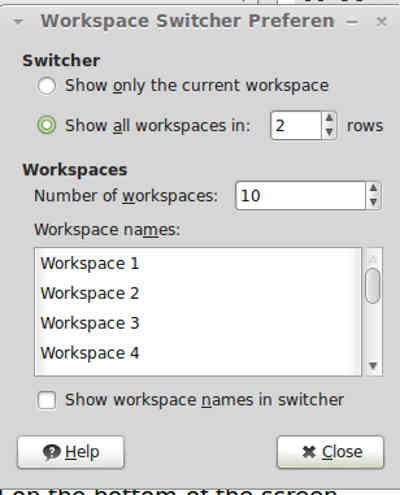
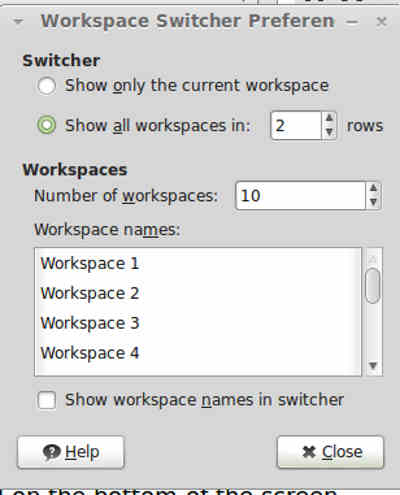
select preferences
WS-screenshot1.jpg will appear
don't select more that 10 in two rows.
Kevin, Alderman
are you seeing this bug?
Paul Lamar