MikroE ARM BASIC compiler.
Greatest thing since sliced bread.
Unlike the 16 bit processors used in Pic (Tracy Crook), Ardunio,
mega-squirt and MicroTech (same as megasquirt).
This 32 bit processor does hardware floating point math.
That makes EFI systems much much much simpler to program. And it is
fast. Same processor type as used in your smart phone. Cheap enough
to use one per injector for ultimate redundancy. The program is much
simpler too.
5 Year olds have learned to program in BASIC. If I can do it any
moron can:)
More on this latter as I am going to use it to control my ignition on
a stock RX8.
Paul Lamar
Paul, Possibly simple when you know. but electronics and I are obviously
sworn enemies and yes I have to get 5 year old grandkids to set my TV
remote. I am obviously another moron and happy to admit it.
Neil.
-
-------------------------------------------------------------------------------------------
This is an old idea but there has been some recent developments that might
make it work. The idea is to measure the EGT
and use that to adjust the mixture. Wide band O2 sensors go
away when burning 100LL so that rules them out for this use.
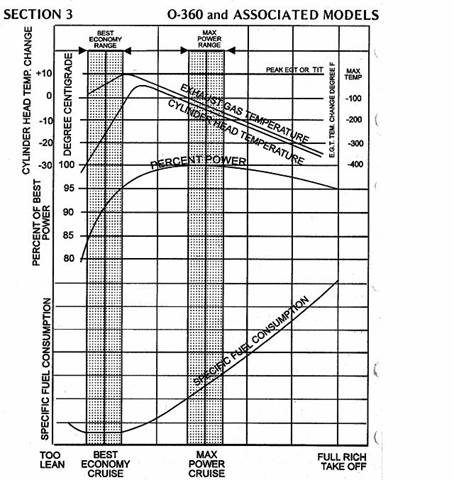
The computer can increase the mixture and check the EGT. If the EGT
goes up your EFI system is on the rich side of the EGT verses mixture
curve. See the attached JPG.
If the EGT goes down your system is on the lean side of the curve. It
takes a few minutes to do this as the EGT probes are not very fast.
It is easy to program this situation in BASIC as once
the computer knows what side of the curve it is on it can tune for
minimum fuel burn or max power.
There needs to be a button on the instrument panel telling the
computer you want to lean for max MPG. Call it the leaning button. The
default is maxpower. If you push the throttle all the way in it can
go back to max power using a micro switch.
Here is a circuit that will put out 5 millivolts per degree C. Feed
it into the ARM A to D pin.
--------------------------------------------------------------------------------------------
When I was at Embedded World I got to talk to the MikroE board
designer and engineer.
He straightened me out on a few misconception
about the Mini MO USB interface. I took my computer with me and he got
it talking
to the Mini MO. Apparently there are several ways to do a USB
interface. They are using a program called a RS232 UART USB.
I think they wrote it themselves.
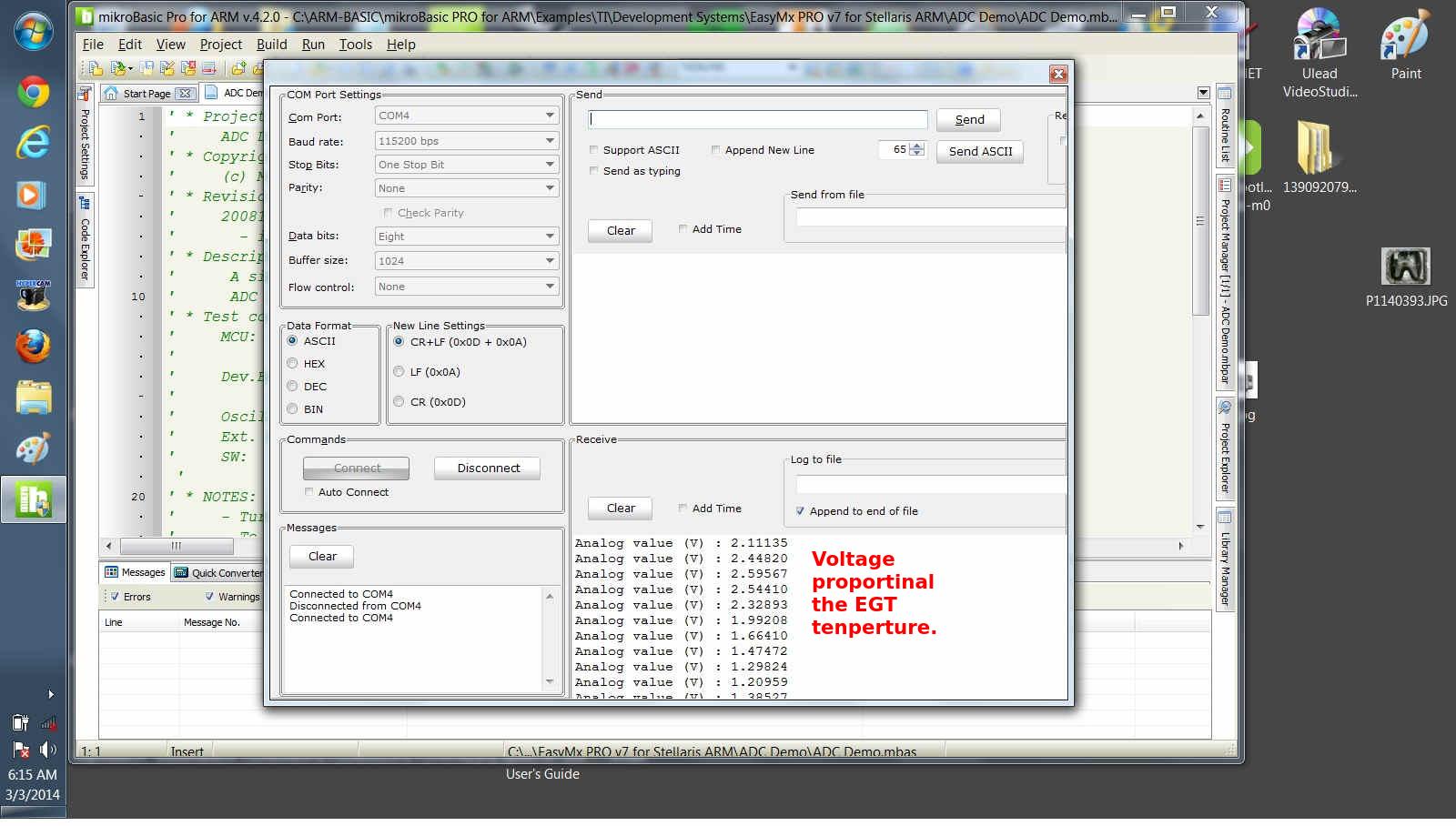
Here is what it looks like on the PC
First you have to set the baud rate to 115200
Then you choose connect and that is all there is to it.
This simple compiled BASIC demo program reads the A to D from the
EGT chip and displays it on the PC screen.
Notice it is a floating point number. Max EGT would be 3.3 volts
and zero Volts EGT would be say 0 Centigrade.
Anything with a ' character is just a comment.
---------------------------------------------------------------
'
' Project name:
' ADC on UART
' Copyright:
' (c) Mikroelektronika, 2014.
' Revision History:
' 20140123:
' - initial release (FJ);
' Description:
' Simple example that demonstrates using ADC and UART modules.
' The example reads analog value from PA0 pin and writes the value
to UART.
' Test configuration:
' MCU: STM32F051R8
'
http://www.st.com/st-web-ui/static/active/en/resource/technical/document/datasheet/DM00039193.pdf
' Dev.Board: MINI-M0 STM32 Board
'
http://www.mikroe.com/mini/stm32-m0/
' Oscillator: HSI-PLL, 48.000MHz
' Ext. Modules: None.
' SW: mikroBasic PRO for ARM
'
http://www.mikroe.com/mikrobasic/arm/
' NOTES:
' - Apply analog voltage (in the range from 0 to 3.3V) to PA0 pin.
'
'------------------------Here is where the program starts PL
program ADC_on_UART
dim adc_value as word
dim analog_value as float
dim analog_value_string as string[23]
' UART write text and new line (carriage return + line feed)
sub procedure UART_Write_Line(dim byref uart_text as string)
UART_Write_Text(uart_text)
UART_Write(13)
UART_Write(10)
end sub
main:
ADC_Set_Input_Channel(_ADC_CHANNEL_0) ' Choose ADC channel
ADC1_Init() ' Init ADC module
Delay_ms(100) ' Wait for ADC module to stabilize
UART2_Init(115200) ' Initialize UART module at 56000 bps
Delay_ms(100) ' Wait for UART module to
stabilize
UART_Write_Line("Apply analog voltage to PA0 pin")
Delay_ms(2000) ' Two seconds pause
while TRUE
adc_value = ADC1_Get_Sample(0) ' Get ADC value from
corresponding channel
analog_value = (float(adc_value) * 3.30) / 4095.0 ' Calulate
applied analog voltage
FloatToStr(analog_value, analog_value_string) ' Convert analog
value to string
Ltrim(analog_value_string) ' Clear leading
spaces of the string
UART_Write_Text("Analog value (V) : ") ' Write strings to UART
UART_Write_Line(analog_value_string)
Delay_ms(500)
wend
end.
-------------------------------------------------------------------------------
Paul Lamar
The Rotary Engine News Letter. Powered by Linux.
ACRE NL web site.
http://www.rotaryeng.net
You Tube
http://tinyurl.com/beqqxas
Copyright 1998-2014 All world wide rights reserved.